ContextItem
Represents a single option inside a ContextColumn.
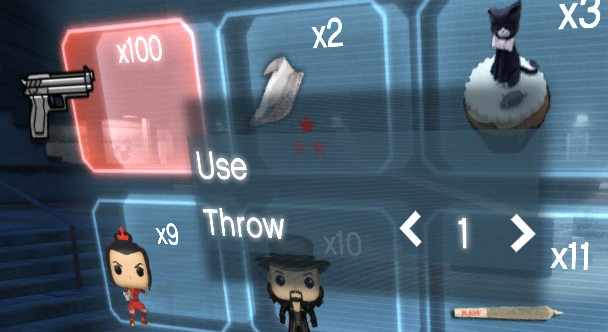
Properties
| Name | Type | Access | Description |
|---|---|---|---|
type | number | private | Type of context item: 0 = simple, 1 = selectable with quantity. |
MaxItems | number | public | Maximum selectable quantity (for type 1). |
Step | number | public | Step for changing the index (for type 1). |
Index | number | public | Current selected index (for type 1). |
Selected | fun(quantitySelected?:number, newMaxQuantity?:number) | public | Callback triggered when the item is selected. |
Methods
| Name | Parameters | Return | Description |
|---|---|---|---|
New | label:string, startIndex:number or nil, maxItems:number or nil, step:number or nil | ContextItem | Creates a new context item. |
Selected | quantitySelected or nil, newMaxQuantity or nil | nil | Event fired when the item is selected pressing Return or A on gamepad. |
ContextItem.New(label, startIndex, maxItems, step)
Create a new ContextItem instance
-
If startIndexisnil, the item is a simple label. Otherwise, it is a selectable item with quantity.
Parameters:
-
label(string): -
startIndex*(numbernil)*: Starting index (if nil, item is selectable without quantity) -
maxItems*(numbernil)*: Maximum selectable items -
step*(numbernil)*: Step for changing index
Returns:
- (ContextItem): the instance of the item.
Example:
local inventory = Inventory.New()
-- [[ Grid 8 by 5 tab]]
local tab8by5 = Grid8by5.New("Grid Tab", "testtxd", "bag")
inventory:AddTab(tab8by5)

local gridUseItem = ContextItem.New("Use") -- simple item without quantity
local gridThrowItem = ContextItem.New("Throw", 1, 3, 1) -- item with quantity
gridUseItem.Selected = function()
    -- code for selected
end
gridThrowItem.Selected = function(selectedQtty, remainingQtty)
    -- code for selected with quantity
end
tab8by5.Context:AddItem(gridUseItem)
tab8by5.Context:AddItem(gridThrowItem)