Server Info API
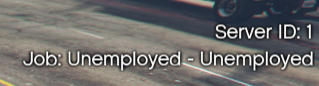
The Server Info component acts as a dynamic information stack. It allows you to list multiple text entries vertically. The background panel automatically resizes (“snaps”) to fit the content whenever labels are added or removed.
⚙️ Internal Architecture
Dynamic Stack Management
Unlike static HUDs that have fixed slots for “Money” or “Job”, this component is a generic List Manager.
- You are not limited to specific data types. You can add a label for “Kills”, “Deaths”, “Faction”, or anything else.
- The internal functions ensure that the visual container always wraps tightly around your active labels, whether you have 1 item or 10.
- Labels support 3D Rotation (X/Y axis) allowing for stylized, skewed text effects within the 2D interface.
Smart Text Handling
To prevent long text from breaking the UI layout, the component includes an automatic overflow system:
- Auto-Cut: If a label becomes longer than 350px (at internal 720p scale), it is automatically truncated.
- Auto-Scroll: When truncation occurs, the text automatically starts scrolling horizontally (Marquee effect), allowing the player to read the full content without the UI taking up too much screen space.
Accessing the API
local Info = exports['eir_hud']:GetEirAPI().ServerInfo
-- or
local Info = exports['eir_hud']:GetServerInfoAPI()
Label Management
All labels are managed via an Integer ID returned when you create them.
AddLabel(text, font, size, outline, alpha, xRot, yRot)
Adds a new text entry to the bottom of the stack.
Parameters:
text:string- The content to display.font:string- Font name (e.g., “$Font2”).size:integer- Font size (Default around 15-20).outline:boolean- Enable black text outline.alpha:integer- Opacity (0-100, default 100).xRot,yRot:number- 3D Rotation/Skewing angle (Optional, default 0).
Returns:
integer: The ID of the newly created label. Save this ID to update the label later.
-- Add a Job Label
local jobId = Info.AddLabel("Police: Sergeant", "$Font2", 18, true, 100, 0, 0)
UpdateLabel(id, text, font, size, outline, alpha, xRot, yRot)
Updates an existing label. Note: You must provide all parameters. If you want to keep a value unchanged, you must pass the current value again.
-- Update the Job Label created above
Info.UpdateLabel(jobId, "Police: Lieutenant", "$Font2", 18, true, 100, 0, 0)
RemoveLabel(id)
Removes a label from the stack and resizes the background.
Info.RemoveLabel(jobId)
Visibility & Positioning
ShowComponent() / HideComponent() / ToggleComponent()
Standard visibility controls.
SetComponentPosition(x, y) / SetComponentSize(w, h)
Standard positioning controls.
SetComponentColour(col)
Updates the tint color of the background panel.
Data Retrieval
GetComponentInfo()
Returns the base component info.
- Returns:
BaseComponentInfo
GetBoundsFromAnchor()
Calculates the exact screen boundaries of the info panel.
- Returns:
BaseComponentData
GetValuesRuntime()
Returns the list of all active labels and their properties.
- Returns:
table{ labels = { ... } }