Reserved Slots API
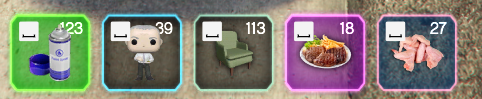
The Reserved Slots component acts as a dynamic Hotbar or Action Bar. It is designed to display up to 10 interactive slots, typically used for weapons, items, or keybinds.
⚙️ Internal Architecture
This component is not just a static display; it includes an internal Input Listener.
1. The Input Loop
Instead of requiring external scripts to detect key presses for visual feedback, the Reserved Slots component handles this internally.
- When you define a slot with an
input(Control ID) and setanimateControlPress = true, the HUD’s internal thread monitors that specific control. - When the player presses the key, the slot visually “clicks” (animates) automatically.
- This creates a responsive UI without the developer needing to sync UI animations with key events manually.
2. Smart Merging
The UpdateSlot function uses a “Delta Update” strategy. It reads the existing slot data and only overwrites the fields provided in the update call. This allows you to toggle a slot’s enabled state or update its ammo count without needing to re-send textures or colors.
Accessing the API
local Hotbar = exports['eir_hud']:GetEirAPI().ReservedSlots
-- or
local Hotbar = exports['eir_hud']:GetReservedSlotsAPI()
Layout & Visibility
ShowComponent() / HideComponent() / ToggleComponent()
Standard visibility controls.
SetComponentPosition(x, y) / SetComponentSize(w, h)
Standard positioning controls.
RedrawAlignment(columns, rows)
Reconfigures the grid layout of the hotbar dynamically.
columns: Number of horizontal items.rows: Number of vertical items.
-- Change layout to a 10x1 Grid
Hotbar.RedrawAlignment(10, 1)
Slot Management
AddSlot(slotData)
Adds a new slot to the end of the list.
- Returns:
integer(The new total count of slots), or-1if failed/full. - Limit: Max 10 slots.
Hotbar.AddSlot({
    txd = "aesir_eir",
    txn = "bandage",
    amount = "3x",
    input = 38, -- E Key
    animateControlPress = true
})
UpdateSlot(index, slotData)
Updates an existing slot at the specified index (1-based). Only the fields provided in slotData will be updated; others remain unchanged.
- Returns:
boolean(Success/Fail).
-- Update slot 1 to show 50 ammo
Hotbar.UpdateSlot(1, {
    amount = "50"
})
RemoveSlot(index)
Removes the slot at the specified index, shifting remaining slots to fill the gap.
index:integer(1-based).
ClearSlots()
Removes all slots from the hotbar.
Data Structures
Slot Data Table
This structure is used for both AddSlot and UpdateSlot.
| Field | Type | Description |
|---|---|---|
enabled | boolean | If false, the slot appears greyed out/disabled. |
amount | string | Text displayed in the corner (e.g., “5x”, “100”). |
input | integer | The Control ID (Index) for the keybind prompt. |
animateControlPress | boolean | If true, the slot animates when input is pressed. |
weaponHash | integer | If provided, automatically loads the weapon icon. |
txd | string | Texture Dictionary (if not using weaponHash). |
txn | string | Texture Name (if not using weaponHash). |
bgColor | color | Background panel color. |
fgColor | color | Foreground (Icon) color. |
actionColor | color | Color used for the keybind prompt/interaction. |
Note: If weaponHash is provided, txd and txn are ignored.
Data Retrieval
GetComponentInfo()
Returns the base component info (Status, ID, etc.).
- Returns:
BaseComponentInfo
GetBoundsFromAnchor()
Calculates the exact screen boundaries of the hotbar.
- Returns:
BaseComponentData
GetValuesRuntime()
Returns the current configuration of the hotbar (current slots, rows, columns).
- Returns:
table