Notifications API
The Notifications component (often called “The Feed”) is a sophisticated queue manager. It handles the sequential display of various alert types, ensuring that high-priority messages are seen while maintaining a non-intrusive flow. It’s a copy of the existing Feed system present in the game, with custom notification, and extra settings it allows a dynamic alternative to the game’s standard notifications.
⚙️ Internal Architecture
The Feed Queue
This system operates as a state machine with the following properties:
- Queue Limit: Holds up to 32 pending notifications (
GAMESTREAM_MAX_POSTS). - Smart Scheduling: If a notification fails to render (e.g., texture not loaded), it enters a “Backoff” state and retries later instead of being discarded.
- Lifetime Management: Notifications expire after
notificationTime(Config) or if pushed out by higher priority items. - Minimap & Layout Awareness: The feed automatically adjusts its vertical position based on the Minimap state (Hidden, Normal, Big Map) and the presence of Help Text or Scripted Menus, still allowing external customizations.
Accessing the API
local Feed = exports['eir_hud']:GetEirAPI().Notifications
-- or
local Feed = exports['eir_hud']:GetNotificationsAPI()
1. Notification Types (Senders)
All functions below return an integer ScriptId. This ID is unique and can be used to remove the notification later.
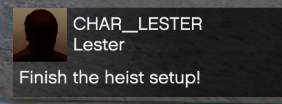
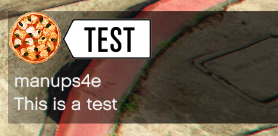
SendTextMessage
Standard SMS/Email style message with a header image.
Feed.SendTextMessage(title, subtitle, msg, txd, txn, icon1, icon2, isImportant, trimBody, crewTag)
title,subtitle(string): Header text.msg(string): Main body text.txd,txn(string): Texture Dictionary and Name for the avatar.icon1,icon2(int): Icon Enums (e.g., Message, Email).isImportant(bool): If true, background flashes red (or configured color).trimBody(bool): If true, cuts long text.crewTag(string): Text to display in the header (e.g., “GTA”).
SendTickerNotification
A simple single-line strip, typically used for money transactions or simple alerts.
Feed.SendTickerNotification(msg, isImportant, useTextIcons, numIconFlashes)
msg(string): The text to display.isImportant(bool): Flashes the strip.useTextIcons(bool): Enables parsing of~r~colors and tokens.numIconFlashes(int): How many times the icon blinks.

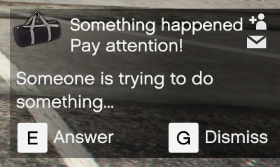
SendActionMessage
A complex notification prompting the user for input (e.g., Job Invites).
Feed.SendActionMessage(title, subtitle, msg, txd, txn, icon1, icon2, input1, action1, input2, action2, isImportant)
-
input1,input2(intstring): Control Index (e.g., 38for E) or a raw string. -
action1,action2(intstring): Label for the action (e.g., “Accept”).
SendStatsNotification
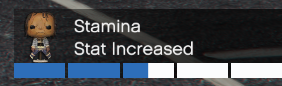
Shows a player stat update with a progress bar.
Feed.SendStatsNotification(title, subtitle, stepVal, barValue, isImportant, txd, txn)
stepVal(int): The amount changed (e.g., +5).barValue(int): The current total percentage (0-100).
SendMultiBarNotification
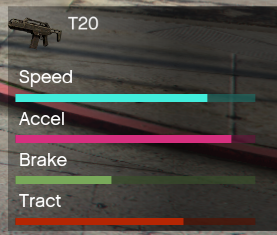
A notification capable of showing up to 4 distinct statistics bars at once.
Feed.SendMultiBarNotification(statBodyStr, txd, txn, lbl0, val0, col0, lbl1, val1, col1, lbl2, val2, col2, lbl3, val3, col3, lbl4, val4, col4)
statBodyStr(string): Main text.lbl0..lbl4(string): Label for each bar.val0..val4(int): Value for each bar (0-100).col0..col4(int/hex): Color for each bar.
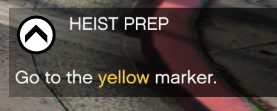
SendMissionNotification
High-priority objective update.
Feed.SendMissionNotification(blip, color, rot, eventTitle, eventDescription, bIsImportant)
blip(int): Sprite ID.color(int/hex): Color of the icon.rot(float): Rotation of the icon.
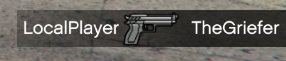
SendKillNotification
Adds an entry to the Kill Feed.
Feed.SendKillNotification(killer, victim, weaponHash, bIsImportant)
killer(string): Name of killer.victim(string): Name of victim.weaponHash(int): Hash of the weapon (displays weapon icon).
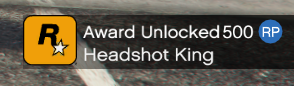
SendAwardNotification
Displays a “Trophy” style popup.
Feed.SendAwardNotification(title, awardName, txd, txn, xpAmount)
xpAmount(int/string): Value displayed in the badge (e.g., “500”).
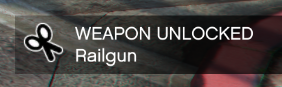
SendUnlockNotification
Generic unlock bar.
Feed.SendUnlockNotification(chTitle, chSubtitle, iconType, isImportant, titleColour)
titleColour(int): HUD Color Enum for the title text.
SendCrewTagNotification
Notification highlighting a specific Crew/Clan.
Feed.SendCrewTagNotification(crewTag, msg, gamerStr, txd, txn, isImportant)
crewTag(string): The tag (e.g., “IGN”).gamerStr(string): Player name.
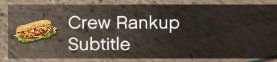
SendCrewRankupNotification
Specific visual for ranking up.
Feed.SendCrewRankupNotification(chTitle, chSubitle, chTXD, chTXN, isImportant)
SendVersusNotification
Displays a Versus bar (Red vs Blue / Player vs Player).
Feed.SendVersusNotification(ch1TXD, ch1TXN, val1, ch2TXD, ch2TXN, val2, vsStr, color1, color2)
val1,val2(int): Scores.vsStr(string): Separator text (default “Vs”).color1,color2(int): HUD Colors for the bars.

SendReplayNotification
Used for Rockstar Editor style updates (Saving, Recording).
Feed.SendReplayNotification(eType, sTitle, sSubtitle, iIcon, pctComplete, bFlash, sIcon)
eType(int): Check Enums - Replay typeiIcon(int): The icon to be used, behaviour changes based on eType, check Replay Icon, if sIcon is not empty, this is ignored.pctComplete(int): Progress percentage.sIcon(string): If not empty, it will be used instead of the predefined icons.

SendTooltip
Similar to the Ticker notification, Tooltip can be multiline and very long.
Feed.SendTooltip(bodyStr, isImportant)
2. Queue & State Management
RemoveNotification(Id)
Instantly removes a specific notification from the screen or queue.
FlushQueue()
Removes all pending notifications that are not frozen or permanent.
ForceFlushQueue()
Removes all notifications immediately, clearing the entire feed.
FreezeNextPost()
Flags the next notification sent as “Frozen”. It will stick to the screen and won’t be removed by the timer until you call RemoveNotification or ClearFrozenPost.
ClearFrozenPost()
Unfreezes any currently frozen posts, allowing them to expire naturally.
CountQueued()
Returns the number of notifications waiting to be shown.
CountShowing()
Returns the number of notifications currently visible.
IsTypeShowing(Type)
Checks if a specific notification type (e.g., Award) is currently active.
Type(int):gstPostTypeEnum.
IsShowing(idx)
Checks if a specific ScriptID is currently visible.
3. Styling & Customization
SetNextNotificationColor(color)
Sets the background color for the next notification sent. Reset immediately after.
color:integer(SColor) or Hex.
SetSnapFeedItemPositions(bool)
true: Items snap instantly to their slot.false: Items slide gracefully (Default).
SetImportantParams(bgR, bgG, bgB, alphaFlash, flashRate, vibrate)
Configures the “IsImportant” flash behavior globally.
SetImportantParamsRGBA(color)
Sets the flash color using a single SColor object.
SetImportantParamsFlashCount(flashCount)
Sets how many times important notifications blink.
SetImportantParamsVibrate(vibrate)
Enables/Disables controller vibration for important notifications.
ResetAllParameters()
Resets styling parameters to default values.
4. Layout & Positioning
SetCustomBaseline(height)
Manually overrides the vertical starting position of the feed.
height:float(0.0 - 1.0).
SetHelptextHeight(height)
Internal use (mostly), sets the offset for standard help text.