Fixed Interaction API
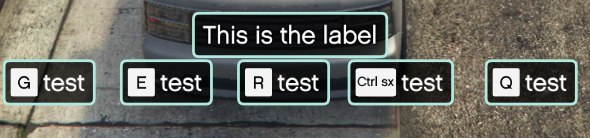
The Fixed Interaction component provides a standardized, visually consistent way to prompt players for actions (e.g., “Press [E] to Open Menu”). Unlike native help text, this component is fully integrated into the HUD’s style, supports custom colors, and handles input logic internally.
⚙️ Internal Architecture
1. The Input Loop
Similar to the Reserved Slots, this component runs its own input listener. You define the keys, and the HUD listens for them.
- Limit: Up to 5 distinct inputs can be displayed simultaneously.
- Callback: When a key is detected, the
callbackfunction provided during setup is triggered immediately.
2. Performance Mode Adaptation
To ensure responsiveness even when the HUD is running in “Performance Mode” (30fps logic tick):
- If you request a JustPressed check (
pressType = 0), the system automatically downgrades it to Pressed (pressType = 1) when performance mode is active. - This prevents “missed clicks” where the player taps a key faster than the 33ms update tick.
Accessing the API
local Interaction = exports['eir_hud']:GetEirAPI().FixedInteraction
-- or
local Interaction = exports['eir_hud']:GetFixedInteractionAPI()
Usage
ShowInteraction(label, background, foreground, inputs, callback)
Displays the interaction panel with specific prompts.
Parameters:
label:string- The main title text (e.g., “Door Locked”).background:color- Color of the panel background.foreground:color- Color of the text/icons.inputs:table- A list of input definitions (see below).callback:function- A Lua function to execute when a button is pressed.
Input Definition Table: Each entry in the inputs list should be a table containing:
input:integer- The Control ID (e.g.,38for ‘E’).label:string- Text description (e.g., “Open”).pressType:integer- 0=JustPressed, 1=Pressed, 2=JustReleased.
Example:
local inputs = {
    { input = 38, label = "Enter", pressType = 0 },  -- E
    { input = 194, label = "Cancel", pressType = 0 } -- Backspace
}

Interaction.ShowInteraction("House Interaction", SColor.HUD_Black, SColor.HUD_White, inputs, function(pressedInput)
    if pressedInput.input == 38 then
        print("Player entered the house!")
        Interaction.HideInteraction()
    elseif pressedInput.input == 194 then
        print("Cancelled.")
        Interaction.HideInteraction()
    end
end)
HideInteraction()
Removes the interaction panel from the screen and stops listening for inputs.
Visibility & Positioning
Standard controls to manipulate the panel’s container.
ShowComponent() / HideComponent() / ToggleComponent()
Manually control the visibility of the component container (rarely used, as ShowInteraction handles this).
SetComponentPosition(x, y)
Moves the panel.
x,y: Screen coordinates (0.0-1.0).
SetComponentSize(w, h)
Resizes the panel.
w,h: Width and Height relative to screen (0.0-1.0).
SetComponentColour(col)
Updates the base tint color.
Data Retrieval
GetComponentInfo()
Returns the base component info.
- Returns:
BaseComponentInfo
GetBoundsFromAnchor()
Calculates the exact screen boundaries of the panel.
- Returns:
BaseComponentData