Equipped Weapon API
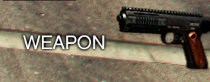
The Equipped Weapon component displays the item currently held by the player. It usually appears in the top-right corner (under the HUD info) and shows the weapon’s name and icon.
⚙️ Internal Architecture
Passive Display System
Unlike the Vehicle Dashboard or Compass, which read game data every frame, this component is Passive.
- It does not run a loop to check
GetSelectedPedWeapon. - It relies on your external scripts (Inventory, Weapon Wheel, or Framework logic) to call the API when the weapon changes.
- This design choice saves resources: checking weapon hashes every frame is unnecessary overhead when inventory changes happen rarely.
Auto-Snapping
Similar to the Server Info component, this panel calls fitting functions internally. This means the background container automatically expands or shrinks to fit the length of the weapon name (label).
Accessing the API
local Weapon = exports['eir_hud']:GetEirAPI().EquippedWeapon
-- or
local Weapon = exports['eir_hud']:GetEquippedWeaponAPI()
Display Methods
Use these methods to update the content of the panel.
SetEquippedHash(label, hash)
Updates the display using a standard GTA V Weapon Hash. The HUD will automatically resolve the correct icon from the game files.
Parameters:
label:string- The text to display (e.g., “Combat Pistol”).hash:integer- The weapon hash (e.g.,`weapon_pistol`).
local ped = PlayerPedId()
local currentWeaponHash = GetSelectedPedWeapon(ped)
-- You would typically map the hash to a friendly name in your script
Weapon.SetEquippedHash("Pistol", currentWeaponHash)
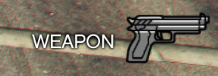
SetEquippedTexture(label, txd, txn, width, height)
Updates the display using a custom texture. This is ideal for Non-Weapon Items (e.g., holding a Water Bottle, Phone, or custom Modded Weapons).
Parameters:
label:string- The text to display.txd:string- Texture Dictionary.txn:string- Texture Name.width,height:integer- Icon dimensions in pixels.
-- Example: Player is holding a Coffee Cup
Weapon.SetEquippedTexture("Hot Coffee", "hud_textures", "coffee_icon", 64, 64)
Visibility & Positioning
ShowComponent() / HideComponent() / ToggleComponent()
Standard visibility controls.
SetComponentPosition(x, y) / SetComponentSize(w, h)
Standard positioning controls.
SetComponentColour(col)
Updates the background tint color.
Data Retrieval
GetComponentInfo()
Returns the base component info.
- Returns:
BaseComponentInfo
GetBoundsFromAnchor()
Calculates the exact screen boundaries of the weapon panel.
- Returns:
BaseComponentData