Compass API
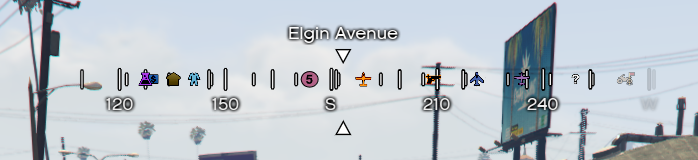
The Compass API allows you to manipulate the navigation bar at the top of the screen. Beyond standard visibility controls, it offers deep customization of visual elements like colors, spacing, and parallax effects at runtime.
⚙️ Internal Architecture
The Compass module is one of the most resource-intensive components due to the math required to project 3D world coordinates onto a 2D scrolling bar. To maintain 0.01ms - 0.05ms performance, it uses a Three-Stage Pipeline.
1. Smart Rotation & Smoothing
The compass doesn’t just read the camera heading every frame.
- Source Agnostic: It can switch instantly between
GameplayCamera(FPS style) andEntityHeading(GPS/Vehicle style). - Delta Threshold: To prevent jittering and unnecessary Scaleform calls (which are expensive), the rotation is only sent to the UI if the angle changes by more than 0.25 degrees. This ensures the UI looks smooth but doesn’t waste CPU on micro-movements.
2. The Blip Collector (Garbage Collection)
Unlike other compasses on the market, where the developer must sync the blips manually to the compass, this Component automatically scans the entire game map for existing blips and their data. Native GTA V functions to find blips are extremely heavy. Running them every frame would kill performance, EirHUD uses a Collector Loop approach:
- The Collector (Every 3s): A separate low-priority thread scans the entire map (IDs 0-921) ignoring the IDs of the ignored table. It caches the handles of all active blips into a Lua table (
AllBlipHandles). - The Filter (Every 2s): The main loop iterates only through the cached handles. It calculates the distance squared (for speed) and discards blips outside the
maxBlipDistance. - The Projector (Every 50ms): Only the visible, filtered blips are processed here. The script calculates the relative angle between the player and the blip, projecting it onto the compass strip.
3. Asynchronous Data Fetching
Street names and generic zone data are not critical for combat or driving.
- Street Names: Updated every 2000ms.
- Blip Visuals: Colors and sprites are synced every 2000ms.
- Blip Position: Angles are updated every 50ms (or 30fps in Performance Mode) to ensure smooth movement.
This hierarchy ensures that critical visual feedback (where is North? where is the enemy?) is instant, while static data (what street is this?) consumes almost zero resources.
Accessing the API
local Compass = exports['eir_hud']:GetEirAPI().Compass
-- or
local Compass = exports['eir_hud']:GetCompassAPI()
Visibility & Positioning
Standard methods to control the component’s presence on screen.
ShowComponent()
Forces the compass to be visible.
HideComponent()
Forces the compass to be hidden.
ToggleComponent()
Toggles visibility state.
SetComponentPosition(x, y)
Moves the compass.
x,y: Screen coordinates (0.0-1.0).
SetComponentSize(w, h)
Resizes the compass container.
w,h: Width and Height relative to screen (0.0-1.0).
SetComponentColour(color)
Updates the primary color (usually the tick marks).
color:integer(SColor).
Runtime Customization
The Compass supports updating its configuration dynamically without restarting the script.
SetValuesRuntime(valuesTable)
Updates one or more visual properties of the compass instantly. You only need to pass the fields you want to change; others will keep their current value.
Parameters:
valuesTable: A table containing any of the valid configuration keys.
Valid Keys:
showParallax(boolean)showDegrees(boolean)showCardinals(boolean)showBlips(boolean)rotationType(int: 0=Cam, 1=Ped)spacing(number)maskWidth(number)tickColor,degreeColor,directionColor(int)fontFamily(string)- … (See
Config.luafor full list)
Example:
-- Change the compass to Red and disable the parallax effect
Compass.SetValuesRuntime({
    tickColor = SColor.HUD_Red,      -- ARGB Red
    directionColor = SColor.HUD_Red, -- ARGB Red
    showParallax = false
})
GetValuesRuntime()
Returns a table containing the current runtime configuration of the compass. Useful if you want to save the player’s preferences and restore them later.
- Returns:
table(Contains all keys listed above).
Data Retrieval
GetComponentInfo()
Returns the base component info (Status, ID, etc.).
- Returns:
BaseComponentInfo
GetBoundsFromAnchor()
Calculates the exact screen boundaries of the visible compass mask. Note: For the Compass, the width is calculated based on the maskWidth pixel value, ensuring high precision.
- Returns:
BaseComponentData