Audio Radio API
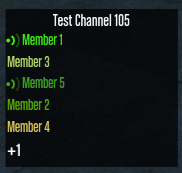
The Audio Radio component provides a visual interface for team communication. It displays the current Radio Channel name and a live list of members, including their talking status. It handles list sorting and overflow automatically.
⚙️ Internal Architecture
Automatic Overflow Handling
To keep the HUD clean, the radio list respects a maxVisibleMembers limit (defined in Config).
- If you add 20 members but the limit is 5, the component displays the first 5 and appends a “+15” indicator at the bottom.
- This ensures the radio list never covers important gameplay elements, regardless of how many people are in the channel.
Priority Sorting
The member list is not just First-In-First-Out. It supports a Priority System.
- When adding a member, you can assign a
priorityinteger. - The list automatically sorts itself to show higher priority members at the top.
- Use Case: You can assign High Command or Dispatch a priority of
10and regular officers0, ensuring leadership is always visible at the top of the list.
Accessing the API
local Radio = exports['eir_hud']:GetEirAPI().AudioRadio
-- or
local Radio = exports['eir_hud']:GetAudioRadioAPI()
Channel Management
SetChannelName(name, font)
Updates the header text of the radio panel.
Parameters:
name:string- The channel name (e.g., “PD Dispatch”, “Frequency 91.1”).font:string- Font style (Optional, e.g., “$Font2_cond”).
Radio.SetChannelName("Police Main - 100.5", "$Font2_cond")
Member Management
Members are identified by their Name. You use the name string to update or remove them.
AddMember(name, font, color, isTalking, priority)
Adds a new person to the list.
Parameters:
name:string- Unique identifier/display name.font:string- Font to use.color:integer- Name color (SColor).isTalking:boolean- Initial voice state.priority:integer- Sorting weight (Higher = Top of list).
-- Add a high priority Dispatcher
Radio.AddMember("Dispatch", nil, SColor.HUD_Red, false, 100)

-- Add a regular unit
Radio.AddMember("Officer John", nil, SColor.HUD_Blue, false, 0)
RemoveMember(name)
Removes the person with the matching name from the list.
Radio.RemoveMember("Officer John")
SetTalking(name, isTalking)
Updates the visual “talking” state (usually an icon or brightness change) for a specific member.
-- Toggle icon on
Radio.SetTalking("Officer John", true)
Visibility & Positioning
ShowComponent() / HideComponent() / ToggleComponent()
Standard visibility controls.
SetComponentPosition(x, y) / SetComponentSize(w, h)
Standard positioning controls.
SetComponentColour(col)
Updates the background panel color.
Data Retrieval
GetComponentInfo()
Returns the base component info.
- Returns:
BaseComponentInfo
GetBoundsFromAnchor()
Calculates the exact screen boundaries of the radio list.
- Returns:
BaseComponentData
GetValuesRuntime()
Returns the current channel name and list of members.
- Returns:
table